

Card fields
Collect card details, customize their appearance, and control the payment button.
Mount the card-entry component after SDK initialization. Your app owns the surrounding checkout and pay button; card values are not exposed to your application.
Mount card fields
Add the component to your screen, configure callbacks, and retain the returned HostedFields and Payment objects.
val fieldsView = AndroidHostedFields(this)cardContainer.addView(fieldsView)val config = HostedFieldsConfig().apply { appearance.variables = FieldsVariables().apply { colorPrimary = "#163B35" inputBackgroundColor = "#FFFFFF" } onReadinessChanged = { state -> showFieldsState(state) } onUpdate = { status -> payButton.visibility = if (status.paymentButtonState == PaymentButtonState.Hidden) View.GONE else View.VISIBLE payButton.isEnabled = status.paymentButtonState == PaymentButtonState.Active } onSubmit = { if (payButton.isEnabled) payButton.performClick() }}val fields = sdk.mountFields(fieldsView, config)val payment = sdk.payment().apply { handlers.onUpdate = { attempt -> renderPayment(attempt) }}payButton.setOnClickListener { payment.createCardTransaction() }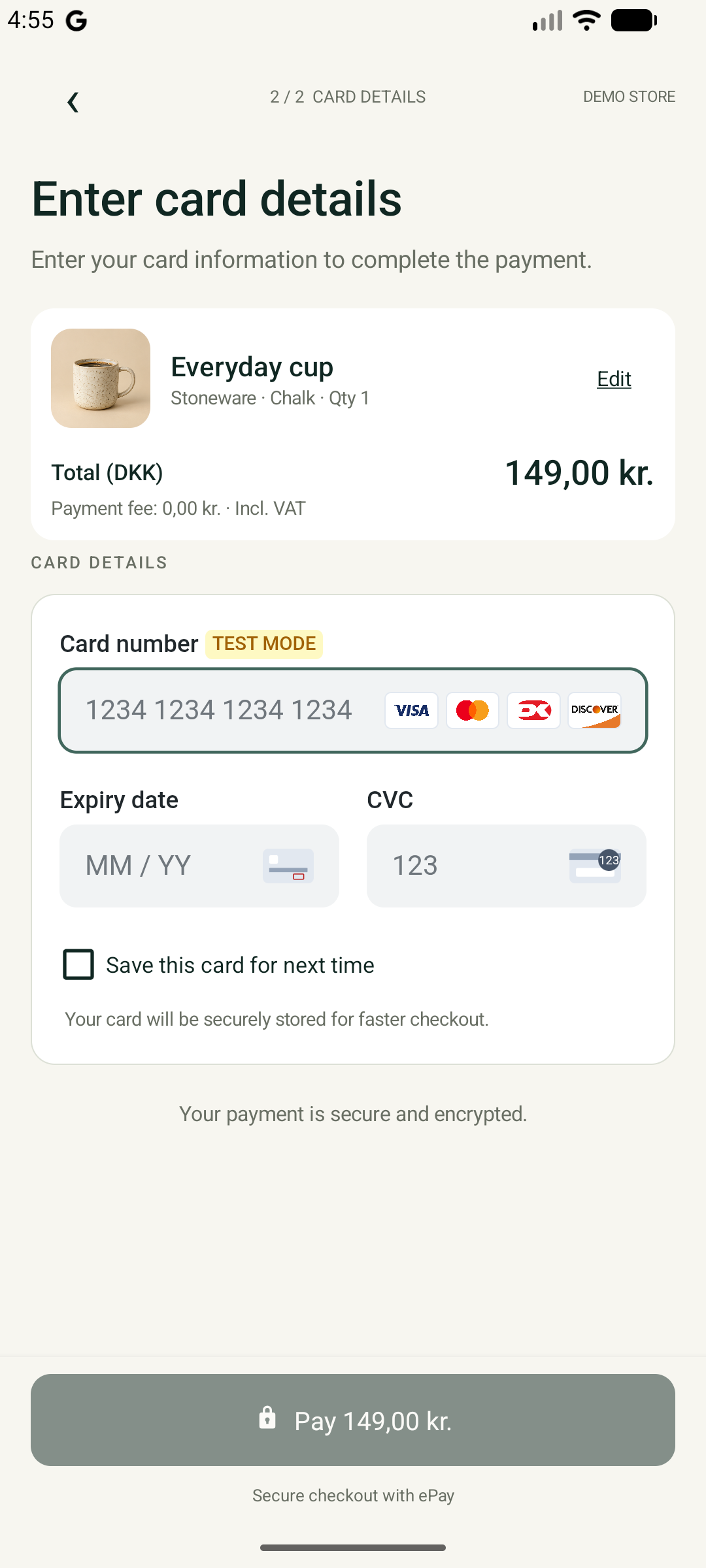
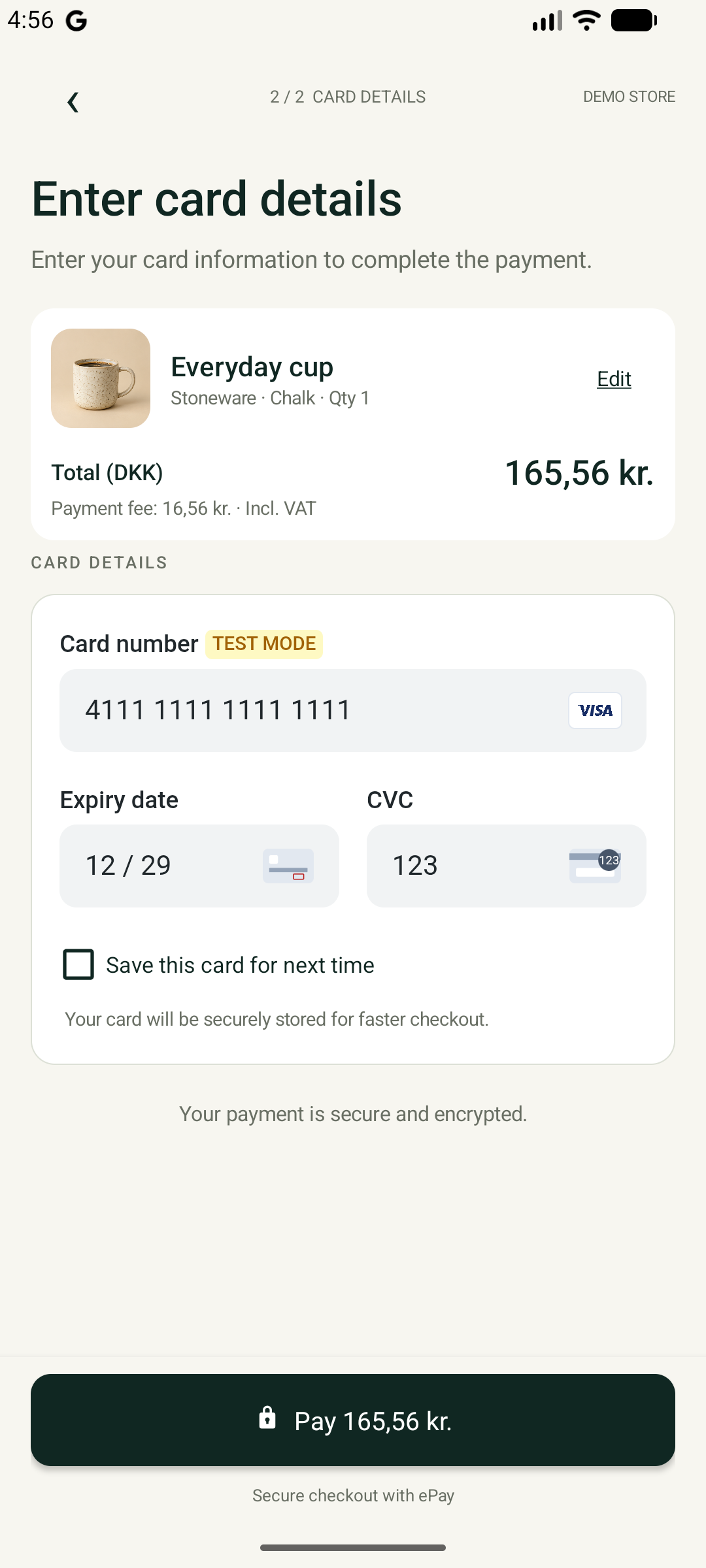
The Android demo combines SDK card fields with its own order summary, storage-consent control, and pay button.
HostedFieldsConfig reference
Appearance, initial layout, and callbacks supplied when mounting card fields.
- appearanceFieldsAppearanceoptional
- Language and visual configuration for the fields. Uses the mobile theme by default.
Properties · FieldsAppearance
Language, theme, and appearance of the card fields. Unspecified styling values use the selected theme.
- languageStringoptionalnullable
- Language code for field labels and messages, for example
daoren. - themeStringoptionalnullabledefault:
"mobile" - Base appearance theme. Defaults to
mobile, which is designed for app checkout. - variablesFieldsVariablesoptionalnullable
- Individual colors, spacing, and typography settings that override the theme.
Properties · FieldsVariables
Card-field style overrides expressed as CSS value strings, such as
#222222,16px, or0. Omit a value to keep the theme setting.- colorTextStringoptionalnullable
- Default text color for labels and input content.
- borderRadiusStringoptionalnullable
- Default corner radius for inputs and the field container.
- borderColorStringoptionalnullable
- Default border color for inputs and the field container.
- fontFamilyStringoptionalnullable
- Font family used for labels, entered values, and placeholders.
- gridColumnSpacingStringoptionalnullable
- Horizontal space between fields, for example
12px. - gridRowSpacingStringoptionalnullable
- Vertical space between fields, for example
16px. - gridTemplateColumnsStringoptionalnullable
- Column sizes for the field grid, for example
1fr 1frfor two equal columns. - iconDisplayStringoptionalnullable
- Display behavior for field icons, for example
blockornone. - cardBrandDisplayStringoptionalnullable
- Display behavior for card-brand icons, for example
blockornone. - supportedSchemesDisplayStringoptionalnullable
- Display behavior for supported card-scheme icons, for example
flexornone. - labelColorStringoptionalnullable
- Text color of field labels.
- labelFontSizeStringoptionalnullable
- Font size of field labels, for example
14px. - labelFontWeightStringoptionalnullable
- Font weight of field labels, for example
400or600. - labelMarginBottomStringoptionalnullable
- Space between a label and its input.
- inputColorStringoptionalnullable
- Text color of entered values.
- inputBorderRadiusStringoptionalnullable
- Corner radius of input fields.
- inputBorderColorStringoptionalnullable
- Border color of input fields.
- inputFontSizeStringoptionalnullable
- Font size of entered values.
- inputPaddingStringoptionalnullable
- Space inside each input border, for example
12px. - inputPlaceholderColorStringoptionalnullable
- Text color of input placeholders.
- inputBackgroundColorStringoptionalnullable
- Background color of input fields.
- inputBoxShadowStringoptionalnullable
- Shadow around input fields, or
noneto remove it. - inputFocusBorderColorStringoptionalnullable
- Input border color while the field has focus.
- inputFocusBoxShadowStringoptionalnullable
- Input shadow while the field has focus.
- windowPaddingStringoptionalnullable
- Space around the fields inside their container.
- windowBackgroundColorStringoptionalnullable
- Background color of the field container.
- windowBorderStyleStringoptionalnullable
- Border style of the field container, for example
solidornone. - windowBorderRadiusStringoptionalnullable
- Corner radius of the field container.
- windowBorderColorStringoptionalnullable
- Border color of the field container.
- colorDangerStringoptionalnullable
- Color used for validation errors and other field problems.
- colorPrimaryStringoptionalnullable
- Primary accent color of the card fields.
- fieldsFieldsConfigurationoptionalnullable
- Visibility and initial behavior of the cardholder-name and card-number fields.
Properties · FieldsConfiguration
Options for individual card fields.
- nameFieldsNameoptionalnullable
- Cardholder-name field settings.
- panFieldsPanoptionalnullable
- Card-number field settings.
Properties · FieldsPan
Card-number field behavior and card-brand controls.
- focusBooleanoptionalnullable
- Focus the card-number field when it mounts. Defaults to true.
- showSupportedSchemesBooleanoptionalnullable
- Show the supported card-scheme icons. Defaults to true.
- showBrandSelectorBooleanoptionalnullable
- Show the brand selector for cards supporting multiple brands. Defaults to true.
- fontSelectionFieldsFontoptionalnullable
- Font source and family selection. Supply
source,family,category, andstacktogether.Properties · FieldsFont
Font selection for the card fields. Provide all four values together.
- sourceStringoptionalnullable
- Font source:
systemfor an available system font orgooglefor a Google Font. - familyStringoptionalnullable
- Name of the selected font family, for example
Roboto. - categoryStringoptionalnullable
- Generic font category, for example
sans-serif. - stackStringoptionalnullable
- Ordered font-family list including fallbacks, for example
Roboto, sans-serif.
- loaderFieldsLoaderoptionalnullable
- Appearance of the loading placeholder shown while fields initialize.
Properties · FieldsLoader
Style of the placeholder displayed while card fields load.
- heightStringoptionalnullable
- Placeholder height as a CSS length, for example
150px. - backgroundColorStringoptionalnullable
- Placeholder background color, for example
transparent. - borderStyleStringoptionalnullable
- Placeholder border style, for example
solidornone.
- initialHeightDoubleoptionaldefault:
190.0 - Space reserved before the fields report their height, in Android density-independent pixels or iOS points. Must be finite and greater than zero.
- onReadinessChangedCallback<SdkState>optionalnullable
- Called when the fields change between loading, ready, and failed states.
- onUpdateCallback<HostedFieldsStatus>optionalnullable
- Receives the current combined field status and subsequent updates. Use its payment-button recommendation to update your checkout button.
Properties · HostedFieldsStatus
Combined snapshot of field readiness, validity, and recommended payment-button state.
- onSubmitCallbackoptionalnullable
- Called when the customer submits the ready fields, for example using the keyboard. Start a card payment from this callback when the payment button is active.
Readiness and button state
HostedFields.state is independent of SDK readiness. Observe onReadinessChanged for Loading, Ready, or Failed, and show an error or recovery action if mounting fails. Use onUpdate for the payment button. Its recommendation includes field validity and whether the SDK can start a payment; you do not need a separate attempt check or manual disabling on click.
PaymentButtonState reference
Recommended visibility and enabled state of your card-payment button. The recommendation accounts for field readiness and whether another payment can start.
onUpdate provides state, paymentButtonState, and isValid. Use these values to update your UI. For validity alone, use onValidityChanged.
onSubmit receives keyboard submission; your app decides whether to start payment. Tapping outside the component dismisses its keyboard automatically. After a retryable decline or safe cancellation, the SDK restores the button recommendation automatically. Reuse the mounted fields and wait for a new shopper action. Accepted payments, exhausted declines, and uncertain outcomes keep the button disabled.
Controls
Call controls after the fields reach Ready. Kotlin calls suspend; Swift calls use try await. Errors throw EpayException. Input validity updates arrive separately.
// Inside a coroutine, with EpayException handled at the UI boundary:fields.focus(HostedFieldFocusData(HostedField.Pan))fields.setLanguage(HostedFieldsLanguageData("da"))fields.clear()HostedFields controls reference
- clear()
- Clear the entered card details without unmounting the fields.
Kotlin suspend · Swift async throws
Returns Unit / Void
Throws EpayException. See error handling.
- focus(data)
- Move input focus to the selected card field. The cardholder-name field must be enabled before it can receive focus.
Kotlin suspend · Swift async throws
Parameters- dataHostedFieldFocusDatarequired
- Card field that should receive focus.
Properties · HostedFieldFocusData
Identifies the card field that should receive input focus.
- fieldHostedFieldoptionaldefault:
Pan - Field to focus. Defaults to
HostedField.Pan; the name field must be enabled before focusingHostedField.Name.
- fieldHostedFieldoptionaldefault:
Returns Unit / Void
Throws EpayException. See error handling.
- setLanguage(data)
- Change the language of mounted fields. After success, the SDK also uses this language for shopper-facing messages.
Kotlin suspend · Swift async throws
ParametersReturns Unit / Void
Throws EpayException. See error handling.
- insertTestCard(data)
- Fill the fields with test card values. Only applies in TEST or PREVIEW mode; ignored in other modes.
Kotlin suspend · Swift async throws
Parameters- dataHostedFieldsTestCardDatarequired
- Test card values to insert into the mounted fields.
Properties · HostedFieldsTestCardData
Test card values to insert into the fields in TEST or PREVIEW mode. Never supply real card details.
- panString
- Test card number as a string of digits.
- expiryString
- Test card expiry in
MMYYformat, for example1230for December 2030. - cvcString
- Test card security code as a string.
- nameStringoptionalnullable
- Optional cardholder name for the enabled name field.
- brandStringoptionalnullable
- Optional card brand to select for the test card.
Returns Unit / Void
Throws EpayException. See error handling.
- dispose()
- Release the component and callbacks. Safe to repeat; remount with a new platform view.
Returns Unit / Void
Focus and keyboard presentation depend on platform restrictions. Session replacement or fields disposal cancels pending controls. Dispose the fields during screen cleanup along with the SDK.
Appearance
Configure HostedFieldsConfig.appearance before mounting. initialHeight reserves loading space in logical pixels (default 190); use a larger estimate when including a cardholder-name field. Content height adjusts automatically.
val appearance = FieldsAppearance().apply { language = "da" variables = FieldsVariables().apply { colorPrimary = "#163B35" inputBorderRadius = "8px" }}// Set appearance before mounting the fields.config.appearance = appearanceFieldsAppearance reference
Language, theme, and appearance of the card fields. Unspecified styling values use the selected theme.
- languageStringoptionalnullable
- Language code for field labels and messages, for example
daoren. - themeStringoptionalnullabledefault:
"mobile" - Base appearance theme. Defaults to
mobile, which is designed for app checkout. - variablesFieldsVariablesoptionalnullable
- Individual colors, spacing, and typography settings that override the theme.
Properties · FieldsVariables
Card-field style overrides expressed as CSS value strings, such as
#222222,16px, or0. Omit a value to keep the theme setting.- colorTextStringoptionalnullable
- Default text color for labels and input content.
- borderRadiusStringoptionalnullable
- Default corner radius for inputs and the field container.
- borderColorStringoptionalnullable
- Default border color for inputs and the field container.
- fontFamilyStringoptionalnullable
- Font family used for labels, entered values, and placeholders.
- gridColumnSpacingStringoptionalnullable
- Horizontal space between fields, for example
12px. - gridRowSpacingStringoptionalnullable
- Vertical space between fields, for example
16px. - gridTemplateColumnsStringoptionalnullable
- Column sizes for the field grid, for example
1fr 1frfor two equal columns. - iconDisplayStringoptionalnullable
- Display behavior for field icons, for example
blockornone. - cardBrandDisplayStringoptionalnullable
- Display behavior for card-brand icons, for example
blockornone. - supportedSchemesDisplayStringoptionalnullable
- Display behavior for supported card-scheme icons, for example
flexornone. - labelColorStringoptionalnullable
- Text color of field labels.
- labelFontSizeStringoptionalnullable
- Font size of field labels, for example
14px. - labelFontWeightStringoptionalnullable
- Font weight of field labels, for example
400or600. - labelMarginBottomStringoptionalnullable
- Space between a label and its input.
- inputColorStringoptionalnullable
- Text color of entered values.
- inputBorderRadiusStringoptionalnullable
- Corner radius of input fields.
- inputBorderColorStringoptionalnullable
- Border color of input fields.
- inputFontSizeStringoptionalnullable
- Font size of entered values.
- inputPaddingStringoptionalnullable
- Space inside each input border, for example
12px. - inputPlaceholderColorStringoptionalnullable
- Text color of input placeholders.
- inputBackgroundColorStringoptionalnullable
- Background color of input fields.
- inputBoxShadowStringoptionalnullable
- Shadow around input fields, or
noneto remove it. - inputFocusBorderColorStringoptionalnullable
- Input border color while the field has focus.
- inputFocusBoxShadowStringoptionalnullable
- Input shadow while the field has focus.
- windowPaddingStringoptionalnullable
- Space around the fields inside their container.
- windowBackgroundColorStringoptionalnullable
- Background color of the field container.
- windowBorderStyleStringoptionalnullable
- Border style of the field container, for example
solidornone. - windowBorderRadiusStringoptionalnullable
- Corner radius of the field container.
- windowBorderColorStringoptionalnullable
- Border color of the field container.
- colorDangerStringoptionalnullable
- Color used for validation errors and other field problems.
- colorPrimaryStringoptionalnullable
- Primary accent color of the card fields.
- fieldsFieldsConfigurationoptionalnullable
- Visibility and initial behavior of the cardholder-name and card-number fields.
Properties · FieldsConfiguration
Options for individual card fields.
- nameFieldsNameoptionalnullable
- Cardholder-name field settings.
- panFieldsPanoptionalnullable
- Card-number field settings.
Properties · FieldsPan
Card-number field behavior and card-brand controls.
- focusBooleanoptionalnullable
- Focus the card-number field when it mounts. Defaults to true.
- showSupportedSchemesBooleanoptionalnullable
- Show the supported card-scheme icons. Defaults to true.
- showBrandSelectorBooleanoptionalnullable
- Show the brand selector for cards supporting multiple brands. Defaults to true.
- fontSelectionFieldsFontoptionalnullable
- Font source and family selection. Supply
source,family,category, andstacktogether.Properties · FieldsFont
Font selection for the card fields. Provide all four values together.
- sourceStringoptionalnullable
- Font source:
systemfor an available system font orgooglefor a Google Font. - familyStringoptionalnullable
- Name of the selected font family, for example
Roboto. - categoryStringoptionalnullable
- Generic font category, for example
sans-serif. - stackStringoptionalnullable
- Ordered font-family list including fallbacks, for example
Roboto, sans-serif.
- loaderFieldsLoaderoptionalnullable
- Appearance of the loading placeholder shown while fields initialize.
Properties · FieldsLoader
Style of the placeholder displayed while card fields load.
- heightStringoptionalnullable
- Placeholder height as a CSS length, for example
150px. - backgroundColorStringoptionalnullable
- Placeholder background color, for example
transparent. - borderStyleStringoptionalnullable
- Placeholder border style, for example
solidornone.
The default mobile theme has neutral filled inputs and green focus styling. default selects the alternative standard theme. Expand variables in the appearance schema for all supported overrides.
The component currently supports manual card entry. Click to Pay and field-specific error callbacks are not exposed. Handle component initialization failures with onReadinessChanged, and payment errors through the attempt and sdk.events.error.